In this Article:
If your Toast device is already working with a card reader, you can check the type of card reader you are using within your Toast app:
- From the Toast app main menu, navigate to Setup > Device Setup.
- Scroll down to the Card Readers section.
- The Card Reader Model will indicate which card reader is used with your device.
If you're trying to identify a reader without a Toast device, see the glossary below for some images you can match to your device.
Back to top
|
Important Notice: Action Required for MagTek eDynamo Readers
The public certificate keys for Visa, Mastercard, American Express, and Discover used in MagTek eDynamo readers expired on December 31, 2024. The card brands have issued a grace period through June 30, 2025, after which continued use of these keys may result in fines or non-compliance penalties. Due to hardware limitations, these keys cannot be remotely removed from eDynamo devices. As a result, all affected eDynamo readers must be removed from service by the end of the grace period.
We recommend taking proactive steps now to phase out these devices. For replacement solutions, see Toast Shop.
|
|
Toast Tap™ (On-Counter)
- Toast's contactless payment reader, separate from the terminal
- Accepts swipe and dip payment as well as Apple Pay, Google Pay, and Samsung Pay
- Not currently available outside the US
| 
|
|
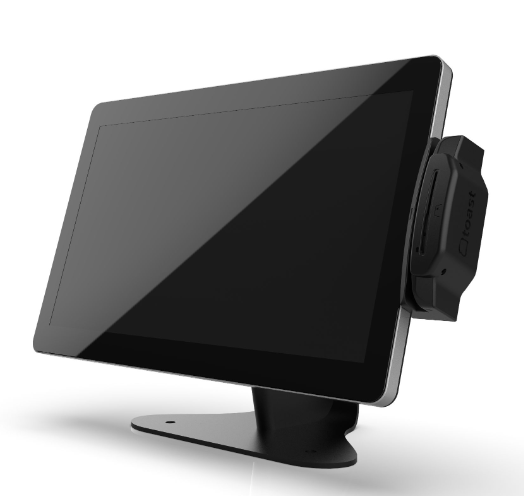
Toast Tap™ (Direct Attach)
- Toast's contactless payment reader, connects and screws onto the terminal
- Accepts swipe and dip payment as well as Apple Pay, Google Pay, and Samsung Pay
- Not currently available outside the US
| 
|
|
MagTek eDynamo
- Has a slot to insert chip cards
- Not currently available outside the US
|  |
|
MagTek Dynamag
- USB Data / Power
- End-to-end encryption
- Not currently available outside the US
|  |
|
Mag Stripe Reader (MSR)
- Swipe card directly
- Frequently used on terminals
- Not currently available outside the US
|  |
Back to top
Card Reader Glossary for UK, Ireland, and Canada
|
AMS1 Card Reader
- Wirelessly paired to the Toast Go® 2
- Accepts swipe, dip, and tap payments
- Not currently available to US customers
|  |
|
V400m Card Reader
- Wirelessly paired to a Toast POS
- Accepts swipe, dip, and tap payments
- Not currently available to US customers
|  |
p400 Card Reader
- Connected through ethernet cabling
- Accepts swipe, dip, and tap payments
- Not currently available to US customers
|  |
|
S1 Handheld and Card Reader
- All-in-one mobile POS and card reader
- Accepts swipe, dip, and tap payments
- Not currently available to US customers
|  |
|
e285 Card Reader
- Toast no longer supplies this reader, but we still troubleshoot and support it
- Not currently available to US customers
|  |
Back to top


