In this Article:
Open Pricing Overview
An open item can be used to ring up items or services that are not included in the menu. The amount/price of an open item is set at the time its added to a check and it can be increased or decreased any time another open item is added to a check. One example for this would be selling pre-loaded gift cards that need to be tax exempt.
As another option, you can make any menu item open price, requiring the server to enter the price when they choose that item on the POS.
Open items can be used to account for corkage fees, room rentals, birthday parties, and one-off events or catering.
Video overview of adding an open item.
Back to top
Configure Open Items in Toast Web
To configure open items in Toast Web, follow these steps:
- In Toast Web, navigate to Menus > Settings > Open items.
- Select +Add to create a new open item, or select an existing open item to edit it.
- Enter a Name and, if desired, a shortened POS Name.
- Next, choose if the open item is taxed and if the open item will have a dining option-specific tax setting (i.e., no tax on takeout/delivery orders).
- If you use courses, choose if the open item should be a specific course and if the open item should print at a specific prep station(s). Note that if you don't make a selection, the open item will print at all prep stations.
- Choose the Sales Category for the open item, and select Yes for Defer Revenue if this open item should not contribute to net sales in reporting.
- Next, choose if the item can be discounted and if it should be included in your rewards program.
- Save and publish your changes.
- Employees will need manager approval in order to add an open item to a check. In order to "remove" the manager approval for open items, an employee should be granted permission 3.25 Open Items.
Note: If you'd like your open item to have a specific name on the ticket, or KDS, check out Get Started With Kitchen Configuration, to learn more about Kitchen Names.
You can use the Product Mix (PMIX) report (Reports > Menus > Product mix) to view sales of open items.
Back to top
Use Open Items on Your Device
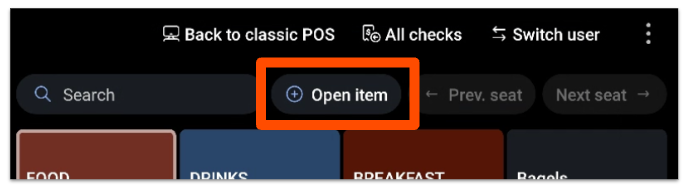
Once you set these configuration items up as needed, you can select it on the POS by using the +Open item button above your menus.
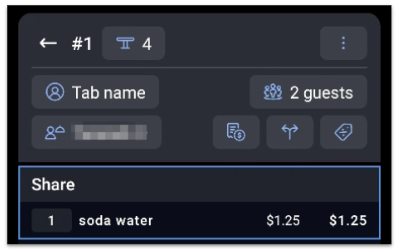
Choose the open item you've just created and enter a name and the price. The item will then appear on the check as you've entered it. In the example below, "soda water" was added as an open price item for $1.25
Note: The maximum price of an open item is $10,000.
Employees who don't have the 3.25 Open Items permission will require a manager passcode to enter $0.00 open items.
Back to top
Configure Open-Priced Menu Items in a Menu or Group
To create an open-price item within a menu or menu group, use these configurations:
- Make sure the Pricing Provider setting on the individual item is set to Specify pricing on this item.
- For the item's Pricing Strategy, choose Open Price.
- Be sure to Save and Publish any changes.
Using an open price on a menu item is very common for daily specials - this way, staff can enter in the current price when they select that menu item on the POS.
Back to top
Use Open-Priced Menu Items In Your Device
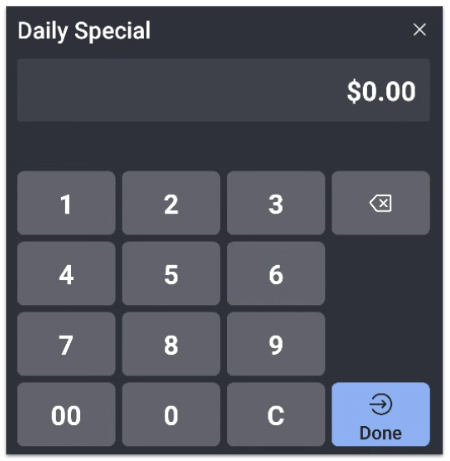
Once an open-price menu item is configured in Toast Web, it will show up on the POS as a regular item but will prompt you for price when selected:
Back to top


