In this Article:
General Ledger (GL) Codes Overview
General ledger codes, or GL codes for short, are numbers created by an entity to categorize types of financial transactions. GL codes typically have a specific numbering format to indicate certain information at each digit. Using GL codes in your business can help you increase financial efficiency and take control of restaurant costs.
Check out our On The Line GL codes blog or our xtraCHEF-specific article, xtraCHEF: General Ledger (GL) Codes, for more information.
Back to top
To create or modify GL codes for mapping, follow these steps:
- In Toast Web, navigate to Reports > Accounts > General Ledger Accounts.
- Select + Add GL Account.
- Fill in the details for your new GL account. These codes will be unique to your system of operations.
- GL Code: General ledger code
- Description: A name/title for the code to help easily identify the code
- Mapped: A yes/no indicator showing if the code is currently mapped (in use). This will populate after a code has been saved to the system.
- Once the codes have been entered, select Save to save your changes before you begin mapping.
Back to top
Once your GL codes have been created, the ability to map them appears below the code list on the same page. The mapping process is divided into four sections:
- Entity: These are preset by Toast for all customers.
- Other Payment Types: This list is populated by any existing alternate payments on your Other payment options page in Toast Web.
- Discounts: This list is populated by any existing discounts on your Discounts and promo codes page in Toast Web.
- Service Charges: This list is populated by any existing non-gratuity service charges on your Service charges page in Toast Web.
Use the drop-down menu to the right of each Entity to select its corresponding GL code. Each entity is pre-programmed by Toast to either be a credit (+) or a debit (-) when the report is calculated. The process of mapping entities to GL codes allows the user to choose what data from Toast is populated on this report and if it reports separately or combined with another piece of data from elsewhere in Toast. Below is a breakdown of all mappable entities that can be assigned a GL code.
| Entity Name | Description |
| Tax | All of the tax that was collected during this time period |
| Cash | Expected Cash Deposit from your cash management report. [Cash Payments + Cash Collected + Cash In + (Cash Out) + (Pay Out) + (Tip Out)] |
| Cash Not Collected | Cash not collected as part of the Shift Review process. Suggested to be mapped to the same GL code as "Cash" in case a mistake is made during closing |
| Credit Card Payments (VMCD) | Credit payment amounts and credit tips. You can choose to map Credit Card Payments and Credit Card Fees together or separately |
| Credit Card Fees (VMCD) | Fees for the VMCD batch |
| AMEX Payments | AMEX payments for the report range |
| AMEX Opt Blue Fees | Fees for the AMEX batch |
| House Account Payments | Sales that are closed to House Accounts |
| LevelUp Payments | Sales closed to the LevelUp payment option |
| Gift Card Redeem | Payments and tips closed by Toast Gift Cards |
| Tips | Tips from customers |
| Tip Outs | Tips paid out to staff |
| Cash Adjustments | From the Cash Management report. Payouts + Cash Outs (does not include Tip Outs) |
| Cash Adjustments (Over/Short) | Adjustments made due to expected vs. actual amounts not aligning |
| Deferred (Gift Card Sales) | Gift cards sold. When a restaurant sells a gift card, that money has to be held as a liability by the restaurant because it could be redeemed at a later time. |
| Deferred (House Accounts) | Payments accepted against a balance on a House Account. This is not accounted for as net sales directly because the food itself may be delivered on a different day |
| Deferred (Other) | Sales of any other menu Item that has been designated as deferred revenue. (an option you can change at the Item level on your menu) |
| Cash Refunds | Cash refunds issued |
| Credit Card Refunds | Credit card refunds issued |
| Gift Card Refunds | Gift card refunds issued |
| Custom Amount Refunds | This will counterbalance any payments that were refunded using the Custom Amount refund type |
| Gratuities | All service charges that were marked as Gratuities in the Toast system |
| Fundraising | Fundraising contributions from customers |
| Fundraising Refunds | Fundraising contribution refunds |
| Paid In Total | Payments received in the date range for sales outside of the date range |
| Deposit Sales Collected | Payments received outside of the date range for sales within the date range |
| Over/Short | Any adjustment needed to balance out credits and debits |
| Merchant Cash Advance Repayment | Payments related to a Toast Capital loan |
There will also be the ability to map Other Payment Types, Discounts, Pay Out Reasons, and Non-Gratuity Service Charges if you have any of these set up. Further down on the page, this mapping process will also allow you to select one of three breakdown options: sales categories, dining options, and revenue centers.
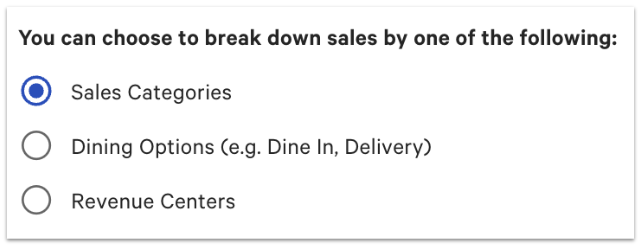
Note: Similar to the other mapping process, you can map a GL code to each of the breakdown fields. Any unmapped field will be rolled into the Over/Short section of your accounting reports.
Back to top


