| You must have the 6.6 Restaurant Operations Setup permission in order to access this navigation path Takeout & delivery > Availability > Takeout/delivery in Toast Web. Learn more about user access permissions here: Permissions Reference Guide. |
For restaurants that have their own delivery drivers, Toast's built-in map feature establishes your restaurant’s delivery area so you can properly set your delivery radius. To set up your Delivery Area, follow these steps:
- Log in to Toast Web and navigate to Takeout & delivery. Scroll down in the Toast Online Ordering settings on that page and ensure that My own delivery drivers is selected for the How do you want to deliver orders to guests?
- Then, scroll down to the Availability section and select Takeout/delivery.
- Scroll down to Delivery Area.
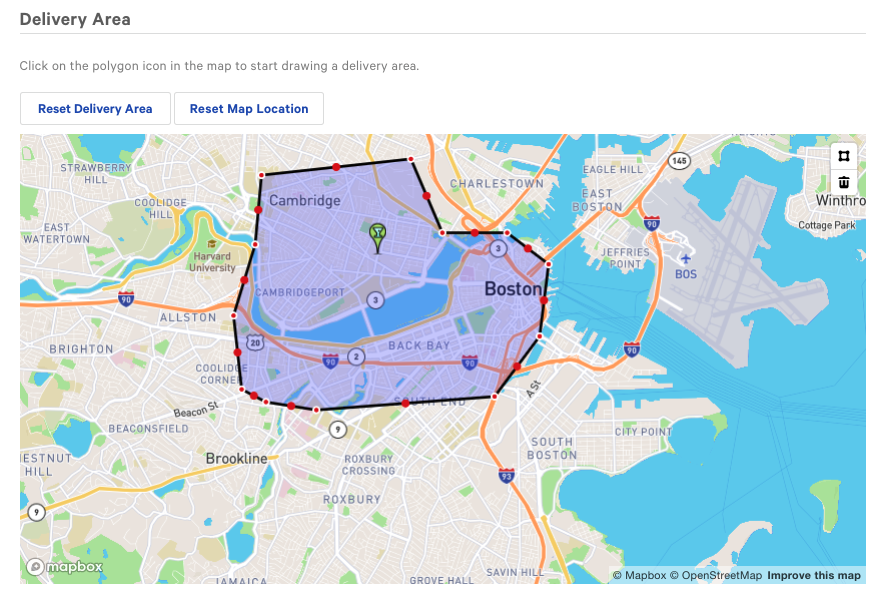
- The green pin identifies your restaurant's location.
- To designate the boundaries of the delivery area, select the box icon at the top right of the map and use the red dots to select the boundaries. You can add red dots by selecting anywhere on the map, and as many dots as you need can be used. The created area and dots can also be selected and dragged to adjust the delivery as needed.
- Select Reset Delivery Area if you must clear an existing territory to create a new area. Be sure to
- Save and publish your changes when complete.



