|
The Local by Toast app is unavailable in Canada, Ireland, and the U.K. at this time. Takeout ordering is available via the Toast POS. Please check back for updates.
|
Restaurants can accept orders for delivery via the Local by Toast app, adding another avenue for guests to place delivery orders.
Want to boost revenue with Local by Toast? Add the Toast Digital Ordering Suite to your account. Already have Toast Online Ordering? Get listed on Local by Toast.
Use our free marketing materials to let guests know you're on Local by Toast. Click the button below to access window decals, Facebook posts, Instagram stories, and more— all free!
In this Article:
Delivery in Local by Toast integrates can be provided with your own in-house drivers or by using Toast Delivery Services (TDS). Guests can order delivery directly through Local by Toast, just as they do through your restaurant's Online Ordering page!
Guests can use the Contactless Delivery function to leave specific instructions for a delivery driver. The guest can determine if they'd prefer to have their orders dropped off rather than directly handed to them. To learn more about Contactless Delivery, check out Customizing Delivery and Pickup Instructions.
You must have Delivery enabled for Online Ordering and be live on Local by Toast for this feature to work. Don't have delivery set up in your restaurant? Check out the Takeout and Delivery Setup Options article to get started.
It's important to note that once this feature is enabled, it is impossible to disable it on the Local by Toast app alone. If a restaurant in Toast Web turns off delivery, it will disable it on both Online Ordering and the Local by Toast app.
You can also opt to use Toast Delivery Services. Toast Delivery Services leverages third-party delivery network partners to dispatch local drivers that allow guests to order delivery directly through you - without hiring your own drivers - while maintaining your margins and guest data. Toast has partnerships with DoorDash and Uber Eats for Toast Delivery Services.
DoorDash Marketplace is a separate option directly integrated with Toast. These orders come in through the DoorDash app. To learn more about the DoorDash Marketplace direct integration, check out Get Started With the DoorDash Integration.
To learn more about Local by Toast, check out our article Get Started With Local by Toast.
To explore the ins and outs of Online Ordering, check out our article Get Started With Online Ordering.
Back to top
This feature inherits the delivery settings you've configured for your restaurant's Online Ordering. This includes delivery range, receipt printing, and delivery fees.
A Delivery order made through the Local by Toast app will appear exactly the same as an Online Ordering delivery order. The kitchen ticket will look the same.
Don't have Delivery set up in your restaurant? Check out the Set Up Takeout and Delivery in Toast Web section of this article Set Up Delivery Using Your Own Drivers to get started.
Back to top
The guest experience adds a delivery option to your restaurant when viewed through the Local by Toast app.
When browsing restaurant options, guests can filter for restaurants that provide takeout or delivery by toggling between Pickup and Delivery.

Once a guest has selected your restaurant and picked what they'd like to order, the option for delivery will appear. If delivery is selected, the user will be prompted to enter their delivery address. If it's out of range, the user will receive an alert. By selecting the Delivery for ASAP button, the guest will be taken to a delivery page where they can change the delivery settings and schedule a future order if needed.
Note: Guests who place a future order scheduled for more than 48 hours in the future will receive an email 24 hours before their order is ready for delivery.
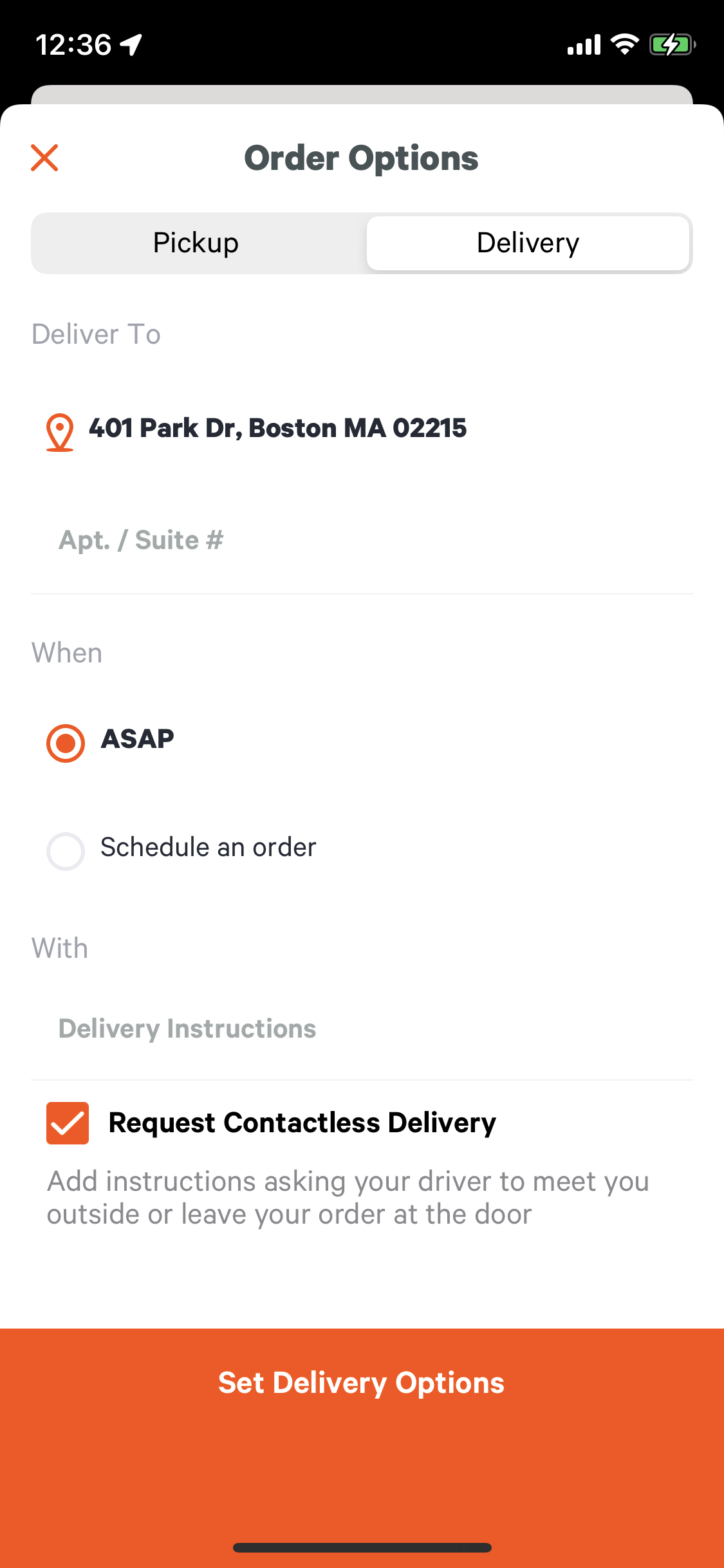
Selecting Delivery will send the order to your restaurant as if the guest has ordered from your Online Ordering website.
Guests can also select recently visited restaurants and reorder recently purchased items on the home screen under the Activity section.

Back to top
To measure the success of First Party Delivery, look under the Sales Summary Report in Toast Web.
- In Toast Web, select Reports > Sales Summary.
- Select the Orders tab.
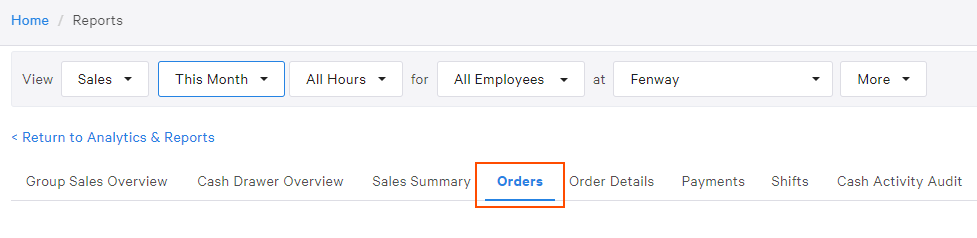
- Use the More drop-down menu and select Dining Option.
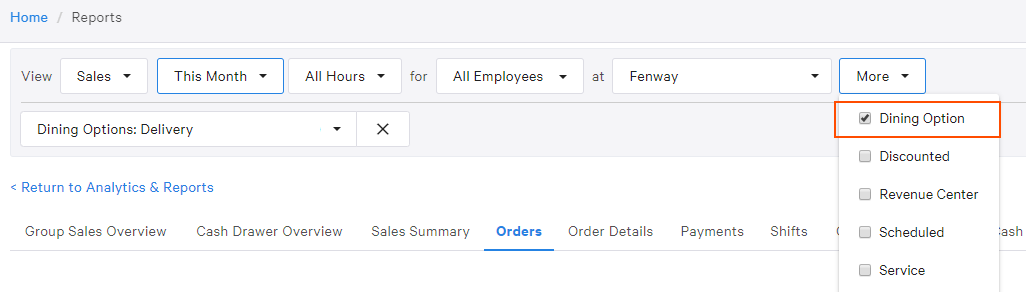
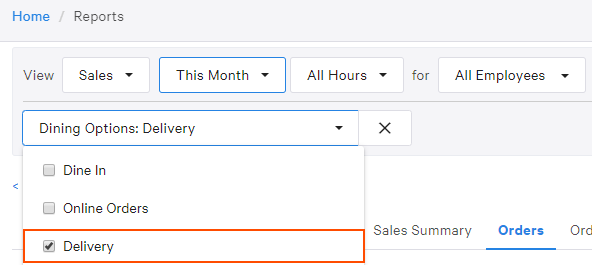
- Select the Dining Option drop-down menu and then select Delivery.
- Use the More drop-down menu and select Source.

- Select the Source drop-down menu and then select Toast Pickup App.

- Select Update.
This report will now show any orders placed for delivery through the Local by Toast app within the selected time frame!
Back to top
Looking to learn more about Local by Toast, Online Ordering, or delivery with Toast? Check out the following articles:
Back to top


