In this Article:
Marketing reports provide information about customers who have visited your restaurant, contact information via digital receipts, and rewards activity. This data will allow you to manage a more direct marketing strategy with your customer base and view who your most loyal customers are. Note that there is currently no exportable report that will show your guests' addresses.
|
Available Reports
|
Description
|
|---|
|
Guestbook
|
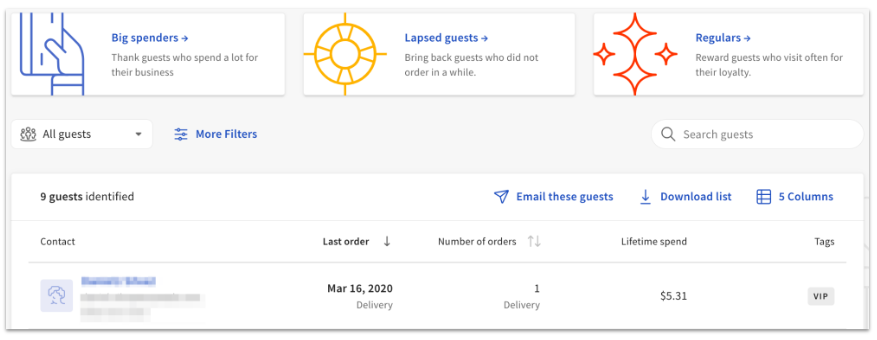
Leverage data such as big spenders, guests who have not ordered in a while, and repeat guests.
|
|
Guest Feedback
|
Pulls feedback from guests from digital receipts, including thumbs up/thumbs down.
|
|
Guest Summary
|
Shows total counts for all gift cards, rewards accounts, and guest credits.
|
|
Guest Credits
|
Shows saved credits to customer accounts that can be redeemed when paying.
|
|
Rewards Accounts
|
An exportable report of all Rewards Accounts and their current points.
|
|
Rewards Transactions
|
A real-time report of the Rewards transactions that are occurring.
|
|
Guest information
|
Provides info about any customers that have visited your restaurant.
Note: This report is retiring, and can be accessed via this direct link for the time being. The Guestbook report is the new version with optimized data reporting features.
|
Back to top
In Toast Web, navigate to Reports. Using the reports navigation on the left-hand side of the screen, select Marketing to open the drop-down and choose the report you'd like to view.
You'll need the 4.13 Customer Credits & Reports permission to access Marketing reports. For more information on permissions, check out the Permissions Reference Guide.
Back to top
Leverage data such as big spenders, guests who have not ordered in a while, and repeat guests.
Back to top
The Guests, Gift Cards, and Loyalty Summary provide a count of all active and inactive gift cards, as well as rewards accounts. Below that table you'll see a summary of Rewards Transactions, which displays the number of transactions and the amount of points for each type of transaction (add value, void add value, signup bonus, etc.). The Rewards Transactions table also details the starting liability, ending liability, and net liability change for rewards points.
Back to top
If you use customer/guest credits, you can view your saved credits to customer accounts that can be redeemed when paying. To learn more about how to configure and use customer credits, check out this Toast Central article: Manage Customer Credits.
Back to top
The Rewards Accounts report is an exportable report of all rewards accounts and their current point balances. You can also view/edit details about each card and manually adjust gift card/rewards point balances from this report. To learn more, check out this Toast Central article: Check or Adjust a Gift Card Balance.
Back to top
This report provides real-time data on the rewards transactions that are occurring. This includes Add Values and Redemptions.
Back to top
Additional Resources for Marketing Reports
Back to top


