In this Article:
The Customer Journey
Welcome to Toast - let’s get started! Our customer onboarding journey is designed to ensure a successful implementation of Toast, so your team can continue to do what they love and thrive.
Your main point of contact throughout this process will be your Toast Onboarding Consultant. Think of them as your general contractor. Together, they'll work with your team to schedule appointments with specialists and guide your business to a successful implementation.
Below is an outline of the onboarding process. The Toast implementation process is typically 4 - 6 weeks long. If you're in a new location undergoing construction, consider this timeline when beginning your onboarding journey.
The following activities must be completed to fully implement Toast. Please use this checklist as a guide. While the activities are presented in sequential order, many can be worked on simultaneously.
Back to top
Kickoff Call
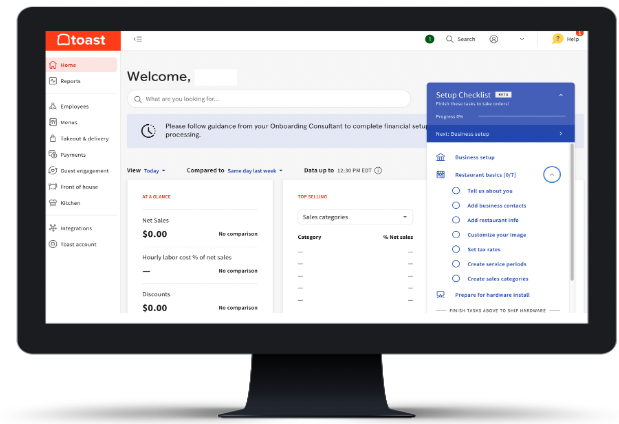
Once you sign your contract and complete your account setup, your Toast salesperson will book a call between you and your Onboarding Consultant. Once this call is booked, this task will appear in your setup checklist on Toast Web (your business back-end). You'll be able to access this checklist at any time using the setup icon in the top right corner.

Select Kickoff call in your setup checklist to get started on a list of items to best prepare for this call.

Need to reschedule? See below for how to reschedule appointments.
During this call, your Onboarding Consultant will set the stage for your implementation process. At the end of this session, you'll have a clear layout of the next steps, timelines, and necessary action items to get up and running on Toast. Below are a few topics that will be reviewed during your kickoff call.
- Confirm business information: Your Onboarding Consultant will confirm your business name, important contacts, location, opening timeline, banking information, and contract start date.
- Review and ship your hardware: Your Onboarding Consultant will confirm the hardware list with you and prepare your order to ship. Depending on location, it takes 7-14 business days to receive your hardware. Once your hardware arrives, check each box to ensure that everything has arrived and is in good condition. Please note that someone must be on-site to sign for your Toast hardware upon delivery.
- Set up Amex: OptBlue is an American Express (Amex) program that enables you to process Amex cards through Toast with consolidated statements and faster deposits. If you have an Amex Direct Merchant ID, your Onboarding Consultant will request it prior to your installation date. Learn more in this Toast Central article, Process American Express Credit Cards.
- Review site readiness: Your Onboarding consultant will review what needs to be ready at your site prior to your Toast installation. This will include confirming that all the necessary cabling, internet speeds, and power sources are available. We recommend that you watch the video below and read our Site Requirements to ensure that your business is prepared for installation. If you have any questions regarding your site readiness, reach out to your Onboarding Consultant for additional guidance.
-
Set dates and deliverables: After you've reviewed Toast’s timeline for implementation, your Onboarding Consultant will work with you to set dates for all of your activation appointments. This will also include a list of deliverables and action items to keep your business on track for a successful Toast implementation. Below is an example of these dates and deliverables.
|
Dates
|
Deliverables
|
- Menu Review
- Manager Training
- Go-Live Readiness Call
- Hardware Installation
- Software/Product Activation Date(s)
- Activation Day Go-Live Support
|
- Menu Templates
- Configuration Checklist
- Ethernet Cabling
- Online Ordering Pictures
- Table Layout
|
|
What should you plan to do before your kickoff call?
- Log in to your Toast Web account and begin working on your setup checklist.
- Start filling out your menu templates (see Build Your Menu Template) & log in to check out Toast Classroom's Get Started With Toast Menus course for an in-depth look at how menus work at Toast.
- Review the Toast Site Readiness Checklist to ensure you're ready with the information about your business operations.
- Assign someone to manage your onboarding with us.
- Plan to be at your business for the appointment with a computer with internet access.
|
Back to top
Build Your Back-End
In the build phase, we will work together to configure your software and build your menu. This part of the process requires your team to work hand in hand with ours to best set your business up for a successful implementation and go-live!
This is also when you will receive your hardware. It's also a great time to complete any additional site readiness tasks.
- Menu: Menu building at Toast is a crucial component of the POS setup. Toast will configure your menu from a set of customizable menu templates which will serve as a foundation for you to edit upon. We will also provide an online screen-sharing session to train on menu editing and review the initial build. If you have purchased the Digital Ordering module, a module's configuration specialist will be able to assist in setting it up with you and will teach you how to make edits in the future as well. Before building your menu, learn the basics of menu management by attending Get Started With Toast Menus on Toast Classroom (login required).
- Toast Web (back-end) configuration: Configuring Toast to meet your operational requirements is very user-friendly. Although most of this will be covered during your training, it is essential to come prepared with a basic configuration complete. Get a head start on configuration by following the setup checklist that pops up in Toast Web. You'll be able to access this checklist at any time using the setup icon in the top right corner. Additionally, you can refer to this Quick Setup Guide to learn how to set up your system. Specific device configuration will take place during your installation appointment.
-
Software activation: Depending on which software modules you have purchased, additional configuration is required. Your Onboarding Consultant will cover specific setup tasks for each software module during your Kickoff call and will be outlined in your setup checklist. Some tasks can be done now, such as gift cards and loyalty imports (learn more: Import Gift Cards) or creating your table layout for Toast Mobile Order and Pay™ (learn more: Create Service Areas and Table Setup), while other action items will need to be done later in the onboarding process, such as setting up your third-party delivery integrations like DoorDash and Uber Eats (Get Started with the DoorDash Integration, Get Started with the Uber Eats Integration ).
|
What should you plan to do before your menu review & configuration sessions?
|
Back to top
Our POS Foundations training (as part of onboarding) is focused on getting your staff and managers ready for day one with Toast so you can feel confident when you start using Toast full-time. We highly recommend checking out both our Toast Central material and Toast Classroom for on-demand and live training materials. You can also see more info on services like the virtual Toast Tutor and premium onsite training here.
- Get Started With Toast Menu: If you have not already completed this training, be sure to do so ASAP, as it is required before you have your menu review with Toast. Here, you'll learn about menu basics, including menu hierarchy, pricing strategy, menu reporting, and more.
- Get Started with Toast POS and Get Started with Toast Web: These courses can be completed via Zoom or in-person. Here you'll learn how to configure Toast Web and purchased products with managers/operators, review reporting, and walk away with a comprehensive to-do list before your Toast activation day.
- Staff Training: This is a 60-minute training session with one of our Toast specialists. This will either be done via Zoom or in person based on the onboarding package you have purchased. With at least 1 terminal powered on, review POS foundations training, time clock, order taking, shift review, and end of day.
You can access all of these trainings after logging in on the Toast Classroom page.
|
What should you plan to do before your training appointments?
- Encourage managers and staff to attend the scheduled training sessions
- Create a training manual template (download a template here) for your managers and staff
- Power on at least 1 terminal or handheld for a hands-on staff training
- Add employees into Toast before training (see Add and Edit Employees and Wages for Toast POS)
|
Back to top
Install Hardware
The Site Readiness Guide provides a comprehensive list of all site readiness requirements. Depending on the onboarding package you originally purchased, your installation appointment will be either via Zoom, phone, or on-site.
We recommend you prepare yourself for the install by checking out:
|
What should you plan to do before your Installation appointment?
- Review the Site Readiness Guide.
- If necessary, hire a certified low-voltage technician to run Cat5e or Cat6 network cables and install power outlets in accordance with the site readiness recommendations.
- Order printer paper rolls and ink - only one roll and ink cartridge will arrive with your hardware.
- Order printer paper rolls and ink - only 1 roll and ink cartridge will arrive with your hardware. Learn more: Printer Paper Rolls and Ink Ribbons.
|
Back to top
Go-Live
This is the big day -- when you go live and start using Toast! We defined your go-live day as the day you take your devices out of test mode and begin using Toast to process credit card payments. We know it can be nerve-racking so our team is here to support you.
- Go-live readiness call: This will be a 60-minute Zoom session with your Onboarding Consultant prior to your activation day. During this call, you will review all configurations in Toast Web and complete any outstanding configuration tasks. This is a great time to ask any remaining questions as you prepare for the big day.
- Go-live support: This is a four-hour session with one of our specialists from our contractor network. Depending on the onboarding package you've purchased, it will either be done via Zoom or in person. On the day you activate Toast, you'll have scheduled one-on-one go-live support for you and your staff. During this time, Toast will assist with any questions or concerns that may arise, train your staff on the job, perform additional configuration, and troubleshoot your system if needed.
- Ongoing support: After your go-live support session has ended you will have access to our 24/7 Customer Support team. Start a live chat here with our Customer Support team. Chat is available in Toast Web and Payroll Web (blue support button in the bottom right of every page) and the Support tab in the Toast Now app.
For more information on contacting support, view "How to Contact Customer Support" or go to support.toasttab.com.
|
What should you plan to do before your go-live support session?
|
Back to top
Adopt
Our Customer Care team is available 24/7/365 to troubleshoot issues and answer your questions. You'll be able to submit a ticket with a team member directly for Toast Central.
Still needing to activate software modules or interested in adding on additional software or hardware? Visit this Toast Central article, Order New Products on Toast Shop, to learn more.
Check out the Toast Resources section below for additional information on all the ways Toast will continue to help once you are live!
Back to top
Activation Appointments
Communication and preparation are key! As you prepare for your business to go live with Toast, it's imperative that you maintain close communication with your Onboarding Consultant and attend all activation appointments.
You can keep track of upcoming appointments and prep instructions in your setup checklist! A complete list of scheduled appointments will be sent in a recap email after your kickoff call.
Completing all tasks in your setup checklist before your scheduled appointments will ensure for smooth and successful onboarding journey as you move towards your activation day. Remember, you can access this checklist at any time using the setup icon in the top right corner.
Note: At this time, appointment reminders will only appear in your setup checklist for single locations and for appointments hosted by a Toast specialist. This typically will not include your Install, Manager Training, Staff Training, or Go-Live Support appointment reminders.
Back to top
Reschedule Appointments
If at any time you realize any appointments require rescheduling, please allow 7 days' notice to avoid rescheduling fees (see Onboarding Rates and Fees for more details) and subsequent delays of other appointments.
To reschedule an appointment, such as a Kickoff Call, Site Survey, Install, Training, or Go-Live, either reach out to your Onboarding Consultant directly or use the setup checklist if applicable.
Please be aware of our cancellation fees:
- $300 fee for cancellations/reschedules with less than 7 days' notice
- $500 if canceled the day of (often due to site readiness)
- See Onboarding Rates and Fees for more information
Back to top
Toast Resources
We have a variety of resources available to you here at Toast to assist not only with your onboarding journey but also throughout your continued experience as a Toast customer!
- Toast Central: There’s a lot you can do starting now! Toast Central makes it easy for you to find answers when you need them. Use help articles, take a training class, or check out staff-training videos and become a Toast expert. Trust us -- this one is bookmarkable!
- Toast Classroom: Visit Toast Classroom for extended manager and staff trainings on topics like menu management, how to use Toast reporting, and more. Choose from expert-led training programs, tutorial videos, and live and on-demand webinars to get the content you need. Also available in Spanish!
- Toast Status Updates: Make sure to subscribe to our Toast status updates to receive the latest information on system status notifications.
- Toast Learn: A one-stop shop for best practices, industry resources, and tips and tricks for running your most successful business. Level up your business with case studies and free tools like employee handbooks, tip pooling calculators, and more. Any business operator can use these resources- even if they don’t have Toast!
- Resources 1-Pager: Resources, education, and support at your fingertips 24/7.
Congratulations on going live with Toast!
Back to top


