In this Article:
If you're adding an EMV card reader to your terminal, it's important to verify that there is not already a magnetic card reader attached to your device.
Unless you have an Elo Guest-Facing Display or Toast Flex for Guest setup (meaning a secondary screen is attached to your terminal facing the guest), only 1 reader can be used per device (Elo V1 or V2). To learn more about dual card reader setups with contactless payments, check out the Toast Central article Guest Pay and Dual Reader Functionality with Toast Tap™.
Don't know what device you have? Check out this Toast Central article, Identify Your Toast Hardware.
If you have a swipe card reader on your device, you'll need to remove and disconnect that reader before pairing with your EMV-capable reader.
Back to top
|
Important Notice: Action Required for MagTek eDynamo Readers
The public certificate keys for Visa, Mastercard, American Express, and Discover used in MagTek eDynamo readers expired on December 31, 2024. The card brands have issued a grace period through June 30, 2025, after which continued use of these keys may result in fines or non-compliance penalties. Due to hardware limitations, these keys cannot be remotely removed from eDynamo devices. As a result, all affected eDynamo readers must be removed from service by the end of the grace period.
We recommend taking proactive steps now to phase out these devices. For replacement solutions, visit Toast Shop.
|
- Unplug the power cord from its power source and unplug the Ethernet cable from the Ethernet port. Set a soft cloth on a flat table and place the terminal face down on the cloth.
- Identify the magnetic card reader located on the left side of the tablet.
- Using a small Phillips head screwdriver (size #1), remove the screws that hold the MSR to the tablet and set them aside for safekeeping. The Elo MSR has 2 screws and the Toast MSR has 3 screws, as pictured below.
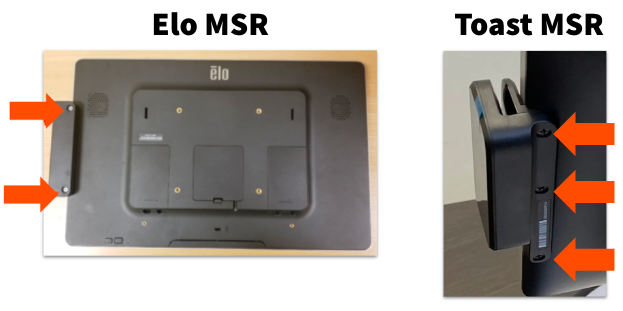
- Gently remove the magnetic card reader from the USB port and set it aside for safekeeping.
We recommend you keep the screws and MSR device for possible future use.
You're all set! If you're replacing your MSR, you can now reattach the new device to your tablet and resecure it with the Phillips head screws. If you're adding an EMV-capable card reader, you're now ready to pair your tablet with your EMV-capable card reader.
Note: If you have a Toast MSR and you need to confirm the serial number, you can find it on the back side of the device near the screws.
Back to top
Back to top


