In the Article:
The Customer Journey
Welcome to Toast - let’s get started! Our customer onboarding journey is designed to ensure a successful implementation of Toast - so your team can continue to do what they love and thrive.
Your main point of contact throughout this process will be your Toast Onboarding Consultant. Think of them as your general contractor. Together they'll work with your team to guide your restaurant to a successful implementation.
Below is an outline of the self-onboarding process. This is typically a 14-day process from beginning to end.
The following activities must be completed to fully implement Toast. Please use this checklist as a guide. While the activities are presented in sequential order, many can be worked on simultaneously.
Back to top
Your Setup Guide
|
Please note that the setup guide mentioned in this section is in the process of rolling out and is currently in a limited release for select customers. If you don't see the guide depicted below you can still access your setup checklist by selecting Setup in the top right corner of any page in Toast Web.
|
Upon logging in to your Toast account (Toast Web) for the first time, you will find a pop-up message welcoming you to Toast and introducing your setup guide. You can select Show me for a guided tour of your guide. You can also select the X button, located in the message's top right corner. Doing so will close the message and allow you to proceed unguided.
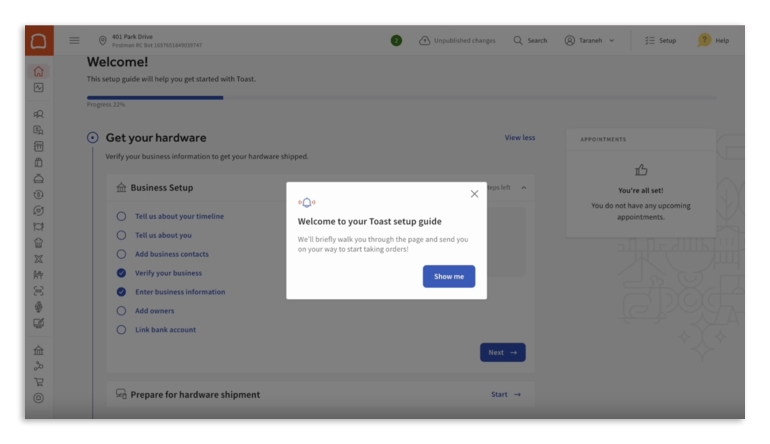
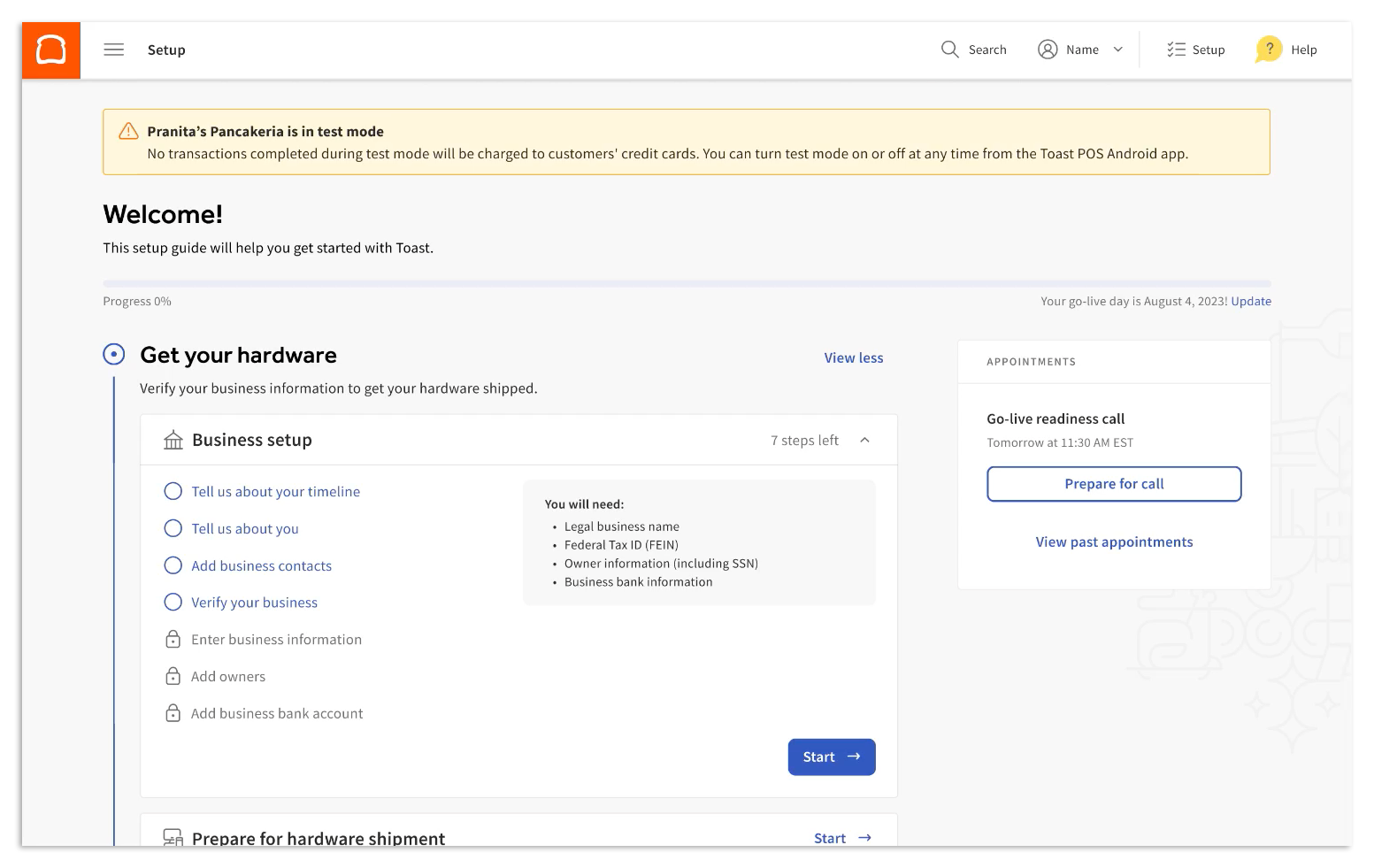
Your setup guide is tailored to your Toast ecosystem and the products you've chosen to implement. Begin at the top of your checklist and work your way down to implement Toast in our suggested order.
Back to top
Kickoff
|
If you purchased via the Toast online platform, the Kickoff call is unavailable.
|
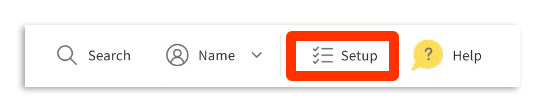
Once you sign your contract and complete your account setup, your Toast salesperson will book a 15-minute call between you and your Onboarding Consultant. From here you'll receive an email to activate your Toast Web account. Please create your account and begin exploring Toast Web, Toast's back-end! On the top right corner of your home page, you will see a setup checklist. This is where you'll begin inputting your restaurant’s information into Toast. You'll be able to access this checklist at any time using the setup icon in the top right corner.
Once this call is booked, this task will appear as an Appointment in your setup checklist.
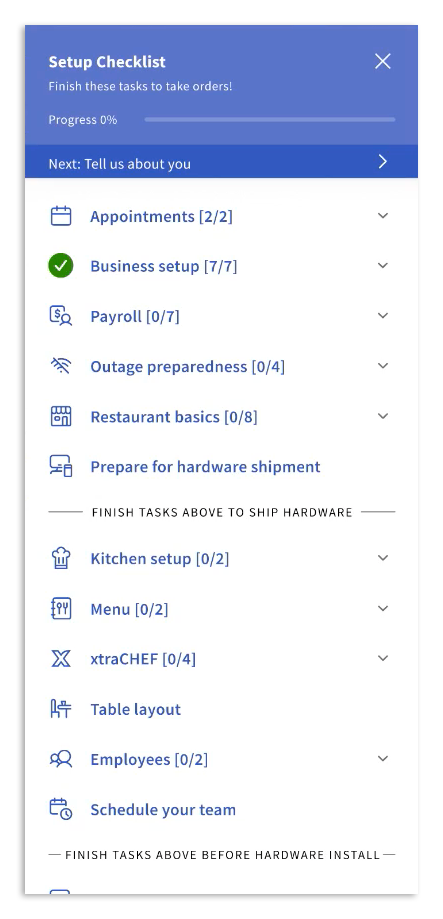
Note: Your checklist is unique to your Toast ecosystem and may differ from the example above.
Select Appointments and Kickoff Call in your setup checklist to get started on a list of items to best prepare for this call. To reschedule any appointments either reach out to your Onboarding Consultant directly or use the setup checklist if applicable.
During this call, your Onboarding Consultant will set the stage for your implementation process. At the end of this session, you'll have a clear layout of the next steps, timelines, and necessary action items to get up and running on Toast. If you have purchased Toast Payroll and/or xtraCHEF, your Onboarding Consultant will assist you in scheduling your first call with your Payroll and/ or xtraCHEF Consultant. Below are a few topics that will be reviewed during your kickoff call.
- Confirm restaurant information - Your Onboarding Consultant will confirm your restaurant name, important contacts, location, opening timeline, banking information, and contract start date.
- Review & ship your hardware - Your Onboarding Consultant will confirm the hardware list with you and prepare your order to ship. It takes 7-14 business days to receive your hardware depending on location. Once your hardware does arrive, check each box to ensure that everything has arrived and is in good condition. Please note there must be someone on-site to sign for your Toast hardware upon delivery.
- Set up AMEX (American Stock Exchange) - OptBlue is an American Express (AMEX) program that enables you to process AMEX cards through Toast with consolidated statements and faster deposits. If you have an AMEX Direct Merchant ID, your Onboarding Consultant will request it prior to your installation date. Learn more in this Toast Central article, Process American Express Credit Cards.
- Review site readiness - Your Onboarding consultant will review what needs to be ready at your site prior to your Toast installation. This will include, confirming that all the necessary cabling, internet speeds, and power sources are available. We recommend that you watch the video below and read our Site Requirements to ensure that your restaurant is prepared for installation. If you have any questions regarding your site readiness, reach out to your Onboarding Consultant for additional guidance.
|
Customer responsibilities:
|
Back to top
Build + Install
In this phase, you're responsible for the configuration and installation of your Toast hardware and Toast Web (back-end). All of these tasks must be completed in order to schedule your 1:1 configuration call with your Onboarding Consultant.
- Install your hardware - Use our installation guides (Toast Flex 14 Installation Guide) to walk you through how to set up your Toast hardware. Your hardware must be completed prior to your 1:1 configuration call with your Onboarding Consultant.
- Configure your back-end - Your restaurant's Toast Web account will be created with smart defaults and pre-configured settings, such as jobs and permissions, discounts, and dining options. Your checklist will have different tasks depending on whether you offer quick service or full service at your restaurant.
- Build your menu - Using the menu builder complete your Toast menu build (see Manage Menus with the Menu Builder for more information). If you have purchased a full menu build your Onboarding Consultant will address next steps in your kickoff call.
- Activate your software - Depending on which software modules you've purchased, additional configuration is required. Specific setup tasks for each software module will be covered by your Onboarding Consultant during your kickoff call and will be outlined in your setup checklist. Some tasks can be done now, such as gift cards and loyalty imports (see Import Gift Cards) or creating your table layout for Toast Mobile Order and Pay™ (see Create Service Areas and Table Setup), while other action items will need to be done later in the onboarding process, such as setting up your third-party delivery integrations.
- Train your team - Sign up for Toast Classroom trainings. Toast Classroom is our one-stop shop for all training programs. Choose from live expert-led classes or on-demand training guides. Manager Essentials and Front-of-House training classes are required for a self-service implementation.
Back to top
Configuration Check-in
After completing your Toast hardware installation, Toast Web configuration, and menu build, it's time to check in with your Onboarding Consultant and Menu Onboarding Consultant.
- Menu review + digital ordering consult - If you choose to do so, you can schedule a menu review, where you'll have an allotted amount of time with our Menu Team to ask questions and review your menu setup. In your digital ordering consult, you will discuss all of the digital ordering products you're using and how to successfully set them up. If additional time is requested, please inform your Onboarding Consultant and they will provide you with next steps.
- Note: You may experience, and Toast assumes no liability for, issues that arise or result from your menu if a Toast-led menu review is not attended. Please reach out to your Onboarding Consultant for additional details.
- 1:1 configuration call - This is a 1-hour check-in call with your Onboarding Consultant. During this call, we'll review your Toast hardware installation and complete any outstanding tests to ensure our equipment is ready for go-live! This will include prep station routing, testing an order, testing a payment, reviewing UI options, and coming out of test mode. This is also a time when we will answer any key training questions that might have come up during your video training sessions.
Back to top
Go-Live
This is the big day -- when you go live and start using Toast! We defined your go-live day as the day you take your devices out of test mode and begin using Toast to process credit card payments. We know it can be nerve-racking so our team is here to support you.
|
Customer responsibilities:
|
Back to top
Activation Appointments
You can keep track of upcoming appointments and prep instructions in your setup checklist! A complete list of scheduled appointments will be sent in a recap email after your kickoff call.
Completing all tasks in your setup checklist before your scheduled appointments will ensure for smooth and successful onboarding journey as you move toward your activation day! Remember, you can access this checklist at any time using the setup icon in the top right corner.
Note: At this time, appointment reminders will only appear in your setup checklist for single locations and for appointments hosted by a Toast specialist.
Back to top
Toast Resources
We have a variety of resources available to you here at Toast to assist not only with your onboarding journey, but also throughout your continued experience as a Toast customer!
- Toast Central- There’s a lot you can do starting now! Toast Central makes it easy for you to find answers when you need them. Use help articles, take a training class, or check out staff-training videos and become a Toast expert. Trust us -- you should bookmark this one!
- Toast Classroom - Visit Toast Classroom for extended manager and staff trainings on topics like menu management, how to use Toast reporting, and more. Choose from expert-led training programs, tutorial videos, and live and on-demand webinars to get the content you need. Also available in Spanish!
- Toast Status Updates - Make sure to subscribe to our Toast status updates to receive the latest information on system status notifications.
- Toast Learn - A one-stop shop for best practices, industry resources, and tips and tricks for running your most successful restaurant. Level up your business with case studies and free tools like employee handbooks, tip pooling calculators, and more. Any restaurant operator can use these resources- even if they don’t have Toast!
- Resources 1-Pager - Resources, education, and support at your fingertips 24/7.
Congratulations on going live with Toast!
Back to top


