Maintain your margins and guest data when you dispatch local drivers through an on-demand network to offer safer, contactless delivery — commission-free. Add Toast Delivery Services® now and start taking orders in one click in under five minutes!
Use this article as a resource for Toast Delivery Services® and Uber Direct/DoorDash Drive support topics. Below are answers to some frequently asked questions.
In this Article:
The delivery quote time your guest sees is determined by your order quote times + your delivery provider’s estimated delivery time. To learn more about setting your quote times, check out this Toast Central article on Manage Your Quote Time Strategy.
The guest then sees that quote time plus the estimated time Uber Direct or DoorDash Driver will take to deliver the order, which your delivery provider calculates.
Here's how it works:
- Set your takeout quote time for how long it takes you to prepare the food.
- Toast then uses that time plus the estimated delivery time from Uber Direct or DoorDash Drive -- that is what your guests will see as the delivery/expected time.
- For example, for an order at 11 a.m. with a 15-minute quote time and 20-minute delivery time from Uber Direct or DoorDash Drive, the guest would see an 11:35 a.m. delivery/expected time.
Your order quote times are used as the pickup time for the driver. This is set up in the Takeout & delivery page in your back-end. To learn more on how to set up your quote time, check out this Toast Central article on Manage Your Quote Time Strategy.
Takeout hours in your Online Ordering schedule are used for Toast Delivery Services®know. These hours cannot be different from Takeout hours at this time. To view, navigate to Takeout & delivery in Toast Web and scroll down to the Online Ordering hours section.
Yes, guests can select a future order time using the drop-down menu when placing an order online. The order will then be fired to the kitchen using the prep and delivery times so it's delivered to the guest by the time they selected. Additionally, if you are creating a scheduled delivery order, please be aware that you will be assigned a delivery pickup time, not a drop-off time. You will want to consider this behavior when setting expectations with your guests. Learn more in this Toast Central article,
Schedule Future Orders.
Back to top
Provider Selection for Toast Delivery Services®
How do I select my delivery provider?
You can switch the delivery provider that powers Toast Delivery Services® at any time in Toast Web. Follow the steps below:
-
- Log in to Toast Web and navigate to Takeout & delivery > Availability > Takeout/delivery.
- Navigate to the Delivery section and choose your provider next to Select your delivery provider.
- Save and publish your changes.
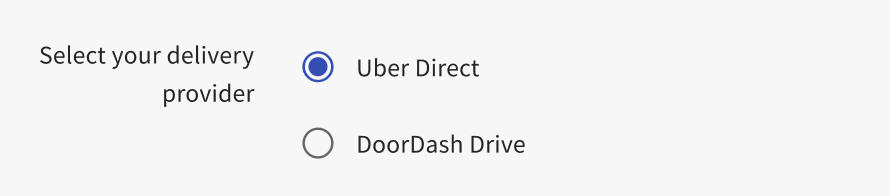
|
Updates to your Toast Delivery Services® delivery provider will go live once you save and publish your changes. The delivery provider that is selected at the time the order is placed will fulfill the order. If you update your delivery provider, you may have scheduled orders that are fulfilled by a different provider than the one you have selected.
|
Back to top
The radius is set automatically by your delivery provider.
Uber Direct:
The default delivery radius is 10 miles (except for NYC) as a straight line (not driving distance). The radius excludes major bridges, airports, and state lines.
DoorDash Drive:
The default delivery radius is 10 miles (except for NYC) as a straight line (not driving distance). The radius excludes major bridges, airports, and state lines.
Note: Please remember that this may differ from your delivery radius on the Uber Eats and DoorDash app.
We recommend checking the following:
- If your restaurant is in NYC, the delivery radius may be less than your delivery provider’s stated delivery radius and might be less. We recommend calling your delivery provider to ask for your specific radius.
- The delivery radius is calculated as the "crow flies" and not the driving distance. If it's more than your delivery provider's stated delivery radius as a straight line, an error will occur when attempting to place the order.
- If it's within your delivery provider’s stated radius there may be an error with your Toast Delivery Services configuration. Please contact Customer Care for help.
Navigate to Service Charges and set the Waive Fee Threshold to $1.00. This will make the delivery fee free to guests.
Yes, the delivery service charge can be edited by logging into toasttab.com, navigating to the Payments header, and selecting Service Charges.
Yes. Multiple delivery fees with different "waive thresholds" can be set up so that the fees drop off as the guest's cart size grows. This helps encourage larger orders to protect against small order sizes.
In the example below there are three Delivery Fees with different "waive thresholds". As the cart size grows, the delivery fee decreases until they all drop off at orders over $100 for free delivery.
Ex. 1: $10 Order would charge the customer a $7.50 Delivery Fee and cost the restaurant $0 (0%)
Ex. 2: A $40 Order would charge the customer a $5 Delivery Fee and cost the restaurant $2.50 (6.25%)
Ex. 3: $100 Order would charge the customer a $0 Delivery Fee and cost the restaurant $7.50 (7.5%)
Back to top
Do guests receive notifications related to their orders?
Yes! Your guests will receive clear text notifications related to their order. Here are some examples of the text notifications they will receive:
-
- Order Approved: "Hey [guest name], your order from [restaurant name] will be delivered by [delivery provider] at [delivery time]. Track your order status at: [link to Toast order tracker]".
- Driver Picked Up: Your driver has picked up your order and is on their way to you.
- Driver Can't Find Address: Your driver is having difficulty delivering your order. Please contact [driver name] at [driver phone number].
- Order Delivered: Your order was delivered! Thank you for ordering from [restaurant name].
These texts will also contain links to your guest's Toast order tracking page. This tracking page has the driver name, photo, and phone number, as well as the restaurant name and phone number associated with their order as seen in the example below.
Note: To see updates on the order tracking page, the guest will have to refresh. Your guest will also have to be logged in to their Toast account when placing the order AND when viewing the tracking link to be able to see the map and the delivery address, otherwise they will just see a delivery status bar showing the order proceed through the necessary delivery steps. To learn more, see: Toast Delivery Services® Order Status Tracking.

Back to top
What do the following dispatch errors mean?
When something goes wrong with an order, an error message will display. Please note that you must be on the delivery screen to see the following errors:
- Dispatch Failure - in this case, try "Redispatch" to get a driver assigned to an order. To do this, select the order and use the Redispatch button on the order screen. For more information on this process, check out this Toast Central article on How to Redispatch a Toast Delivery Services Order.
- Redispatch Failure - in this case, cancel the order and re-enter the order to try again.
- Order could not be updated - in this case, call Uber Direct or DoorDash Drive support to update the date/time of delivery.
Back to top
Call the driver using the driver's phone number listed on the order in POS. If you can't contact the driver, call Uber Direct at (866) 987-3750 or DoorDash Drive at (855) 222-8111. You must call from the phone number that you have listed in Toast to reach the driver.

Toast POS customers can find out more about how to access order numbers and driver contact information in this Toast Central article, "Optimize Toast Delivery Services POS Order Tracking Workflow."
The order number is on the POS screen as indicated below in the Payment Terminal and Orders Hub examples.
Uber Direct:
- If you have an issue with a live order such as a late driver or you need to cancel the order, you can call 866-987-3750, such as a late driver, for immediate help.
- If you have an issue such as a refund request you should email uberdirect@uber.com.
- Check out this document here with all of Uber Direct's support information!
DoorDash Drive:
- If you encounter an issue with a live order, such as a delayed driver or the need to cancel the order, call (855) 222-8111 for immediate assistance.
- If you have an issue, such as a refund request, you should email drive-support@doordash.com.
Only the restaurant can reimburse the guest at their discretion. Depending on the refund reason, you can then contact Uber Direct or DoorDash Drive to be reimbursed for the refund:
Additionally, if you've refunded a guest for their undelivered order, but still need to remove the delivery fee in order to close the check, follow these directions:
- Open the check (order) on your POS and select Pay.
- Look for the Service charge button at the bottom of the screen.
- Tap the checkbox next to the delivery fee to unselect it, and remove it from the check.
- Select Done to confirm the changes.
Back to top
How does billing for delivery fees and driver tips work?
Toast withholds TDS delivery fees and driver tips from your daily credit card settlement payouts on a per-order basis. When your credit card sales are processed by your credit card processor, TDS delivery fees and tips are deducted before those amounts are settled and deposited into your bank account. Should an order be subsequently amended, updated charges will be withheld from the next available credit card batches. Order adjustments resulting in refunds of order value, delivery fees, or driver tips will be credited against each subsequent order’s withheld fees and tips until the total amount is refunded. For TDS billing and refund questions, check out the following Toast Central articles:
Back to top
Who receives the Toast Delivery Services® guest data?
The restaurant receives guest data like a typical online order.
Back to top
Managing Order Volume for Toast Delivery Services®
Can I add a delay to my orders while using Toast Delivery Services®?
Yes, you can add a delay to your Toast Delivery Services® orders the same way you would add delays to takeout orders. Check out this Toast Central article on Managing Online Order Volume (Delaying/Snoozing Orders) to learn more. Note that to add a delay to these orders, you will need to add a Takeout delay to adjust the quoted time for Toast Delivery Services®. The takeout/pickup quote time will adjust automatically as a result. The quote time for guests will appear as the takeout quoted time + any delay added + your delivery provider’s estimated delivery time.
Back to top
To enable Toast Delivery Services for Online Ordering, navigate to Takeout & delivery > Availability > Takeout/delivery in Toast Web and scroll down to the Delivery section. From here, you can enable Toast Delivery Services.
Make sure you have selected the Dining Option Toast Delivery Services on the KDS. Check out this article on Ticket Routing & Filter Options for instructions.
Check out this Toast Central article on Toast Delivery Services Reporting for reporting details.
Yes, check out this article, Optimize Toast Delivery Services® POS Order Tracking Workflow, to learn more.
No, only debit and credit card payments can be accepted with Toast Delivery Services®.
No, if you are using your delivery drivers for your restaurant, you will not be able to use the Toast Delivery Services® feature. Restaurants cannot have both at the same time and cannot switch back and forth (ex. cannot have Toast Delivery Services on the weekends and your drivers on weekdays).
No, you cannot remove the takeout dining option at this time for guests placing online orders. Both takeout and delivery must be enabled to use Toast Delivery Services at this time.
Yes. Toast does support alcohol deliveries through Toast Delivery Services. See this Toast Central article on Toast Delivery Services® Alcohol Delivery for more information. Restaurants should also review the flow-down Uber Direct and DoorDash Drive Merchant Terms for restrictions on the delivery of age-restricted items.
Note: All applicable menu items must be labeled as an alcoholic item. If not, your Toast Delivery Services account can be deactivated.
Toast Delivery Services® requires an up-to-date pickup address. The address on the Restaurant info page in Toast Web is sent to the driver for pickup. If your food truck is consistently parked in the same location and you use DoorDash as your delivery provider, you can use Toast Delivery Services®. However, if you move multiple times during the day, Toast Delivery Services® may not be the right solution for you. Note: At this time, Uber Direct does not support delivery pickup for Toast Delivery Services®.
Toast Deliver Services® is available for Catering & Events. For more information, see the Enable Toast Delivery Services® for Third-Party Ordering Partners section in Optimize Toast Catering & Events.
Is my TDS driver an employee or a salaried hourly?
-
-
- If set to Hourly, you will need to complete a shift review for the TDS Driver.
- If set to Salaried, you will not need to complete a shift review.
Both options must be assigned to the job title called Delivery Service Driver. The driver does not need to clock in if set to Hourly work.
Back to top
Back to top


