| If you have employees who opted into a paper Form W-2, you are responsible for distributing these Form W-2s by the SSA deadline of January 31. You can elect for Toast to print and ship them to you for $5 per form plus shipping fees or you can print them on your own (default). Either way, you are responsible for distributing these paper forms individually. Toast cannot mail Form W-2s directly to employees. Employees who are opted into electronic Form W-2s can log in to the MyToast app or Toast Payroll and retrieve them on their own with no action necessary from employers. |
In this Article:
How Employers Can Download Form W-2s
- On or after January 19, 2026, navigate to Taxes. Learn more about how the Tax Center can assist you during year-end by reviewing Toast Payroll: Manage Payroll Taxes.
- To download only the paper Form W-2s you're responsible for distributing, select the 2025 Paper W-2s button in the banner at the top.
- Bulk Form W-2s can be downloaded from this Taxes page, but individual employee Form W-2s are available in their respective profiles under Taxes & Documents > Year-End Documents, whether they opted into a paper or electronic form.
- If you do not see this button, either Toast is printing your paper Form W-2s for you and you must still distribute them or none of your employees are opted into a paper Form W-2. If the Tax Center displays a No paper W-2s to distribute message, you are not be responsible for printing or distributing any Form W-2s.

- You can also download Form W-2s for employees who opted into an electronic copy, but this is not required. Select the download arrow icon underneath Employees opting for electronic W-2s. You can access them individually from an employee's profile > Taxes & Documents > Year-End Documents as well.
Back to top
How Employers Can Print Form W-2s
- Load your printer with enough standard letter-sized, plain white paper.
- In your preferred PDF viewer, open the 2025 Paper W-2s file you downloaded above. If you downloaded the file in Google Chrome, you can open it from the browser by selecting the three vertical dots in the upper-right corner and selecting Downloads.
- Select File > Print.
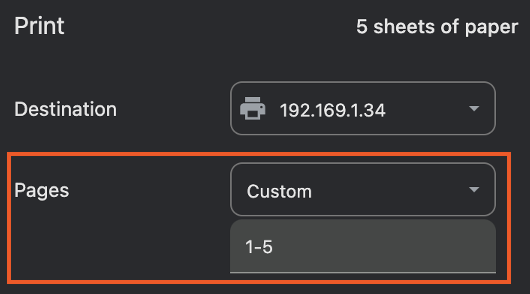
- You should not need to select any custom print settings unless you'd like to only print a certain number of Form W-2s. Pages can be set to All or Custom, depending on which Form W-2s you'd like to print. A Custom example is shown below.
- If you're experiencing formatting issues, note that employee Form W-2s are designed across multiple pages with larger print for better readability.
- Once you've printed Form W-2s, you can hand-deliver them to employees or, for former employees or employees you may not see before January 31, send them through the mail. You can use this style of envelope to ship Form W-2s. The employer and employee addresses are left-aligned to fit in this style of envelope.
Back to top
Additional Resources
Back to top
This content is for informational purposes and is not intended as legal, tax, HR, or any other professional advice. Please contact an attorney or other professional for advice.


