In this Article:
Tip Credit and Tip Makeup Overview
A tip credit is the amount of the tips that the employee receives that can be credited towards the employer's minimum wage obligation. The FLSA and many state laws allow employers to take a tip credit. Employers must provide specific information to tipped employees before taking a tip credit. A tip credit is generally the difference between the minimum wage and the employee's direct wage. If an employee's tips combined with direct wages of at least $2.13 an hour do not equal the minimum hourly wage, the employer must make up the difference (tip makeup).
- Employers must ensure employee wages meet the minimum wage requirement for the number of hours worked in a workweek. See Toast Payroll: Get Started With 2026 Minimum Wages for more information.
- Under the FLSA, tip credit can be taken from employees who earned at least $30 a month in tips.
- The maximum amount of tip credit is limited by regulations. For example, under the FLSA, an employer cannot take more than a $5.12 tip credit per hour. You must ensure that the direct wage in the system is equal to or greater than the minimum cash wage allowed.
Note: The tip credit taken is listed at the bottom of an employee’s pay stub so they can understand how their wages are calculated. Tip credit is not visible until after payroll is posted and pay stubs are generated.
Tip Makeup is calculated as the amount needed to be added to the employee's direct wages and tips if they do not equal minimum wage. It is an automated earning code that appears once payroll is calculated to ensure that the employee’s pay meets the minimum wage requirement for their hours worked. Tip makeup cannot be disabled for an individual payroll. Ensure hourly rates and tip amounts are correct for accurate reporting of tip makeup.
Note: Toast Payroll has populated the system for the calculation of tip makeup and overtime with the federal, state, or local minimum wage that may be applicable to many customers. However, you are responsible for verifying that the rate in the system is applicable to your business. Information on how to verify the system minimum wage rate can be found in Toast Payroll: Minimum Wage.
Employee's minimum wage is calculated based on the address of the assigned work tax location. This information is required during the new hire process. If you're looking for more information on checking or setting a minimum wage, refer to this guide.
Additional information on minimum wage and tip credits can be found on local, state, and federal government websites or through your complimentary HR toolkit, Mineral.
Back to top
Calculate Tip Makeup
- When payroll is calculated, the system runs a calculation to determine if tip makeup is needed. The calculation is based on the minimum wage populated in the system.
- The minimum wage for an individual employee is displayed on their profile under Employment > Recurring > Settings. Toggle the slider to Yes to view and/or edit their minimum wage.
- Hours/Earnings is considered tip makeup-eligible based on how the earning code is set up. Typically, this is all tipped earnings, REGULAR, and OVERTIME. If you have questions about which earning codes in your system are flagged as tip makeup-eligible, reach out to payrollsupport@toasttab.com.
- The system then looks to see if all tip makeup-eligible wages are less than the minimum wage amount for the pay period.
- If the paid tip makeup-eligible wage is less than the minimum, the system adds a Tip Makeup earning code to bring the employee's earnings to the minimum wage. This earning will appear with a rate of the difference between the employee's direct wages and tips and the minimum wage populated in the system.
Back to top
Regular Wages Only Example
For this example, guaranteed minimum wage is the minimum wage that is populated in the system.
- Minimum wage: $7.25 per hour
- Direct cash wage: $5.00 per hour
- Hours worked: 30
- Hourly wages: $150 ($5.00 x 30 hours)
- Tips: $30
- Total earnings: $180
$180 total earnings / 30 hours worked = $6 per hour
Calculation:
- Guaranteed minimum wage: 30 x $7.25 = $217.50
- Tip makeup = guaranteed minimum wage - total earnings
- Makeup eligible earnings = $217.5 - $180 = $37.50 in tip makeup
As it appears on a pay stub:
- $7.25 (minimum wage) - $6 (employee's hourly earning) = $1.25 x 30 (hours worked) = $37.50 in tip makeup
Back to top
Overtime Included Example
For this example, guaranteed minimum wage is the minimum wage that is populated in the system.
- Minimum wage: $7.25 per hour
- Direct cash wage $2.13 per hour
- Hours worked: 40
- Hourly wages: $85.20 ($2.13 x 40 hours)
- Regular tips: $130
- Total regular earnings: $215.20
$215.20 total regular earnings / 40 regular hours worked = $5.38 per hour
- Minimum overtime wage = $10.88
- Maximum tip credit: $5.12
- Direct cash overtime wage: $10.88 - $5.12 = $5.76
- Overtime hours worked: 10
- Overtime wages: $57.60 ($5.76 x 10 hours)
- Overtime tips: $20
- Total overtime earnings: $77.60
$77.60 total overtime earnings / 10 overtime hours worked = $7.76/hour
Calculation:
- Guaranteed minimum wage: (40 x $7.25) + (10 x $10.88) = $398.80
- Tip makeup = guaranteed minimum wage - total earnings
- Makeup eligible earnings = $398.80 - ($215.20 + $77.60) = $106 in tip makeup
As it appears on a pay stub:
$7.25 (regular minimum wage) - $5.38 (employee's regular hourly earning) = $1.87 x 40 regular hours worked = $74.80
$10.88 (overtime minimum wage) - $7.76 (employee's overtime hourly earning) = $3.12 x 10 overtime hours worked = $31.20
$31.20 + $74.80 = $106 in tip makeup
Back to top
Tip Makeup With Biweekly Payrolls
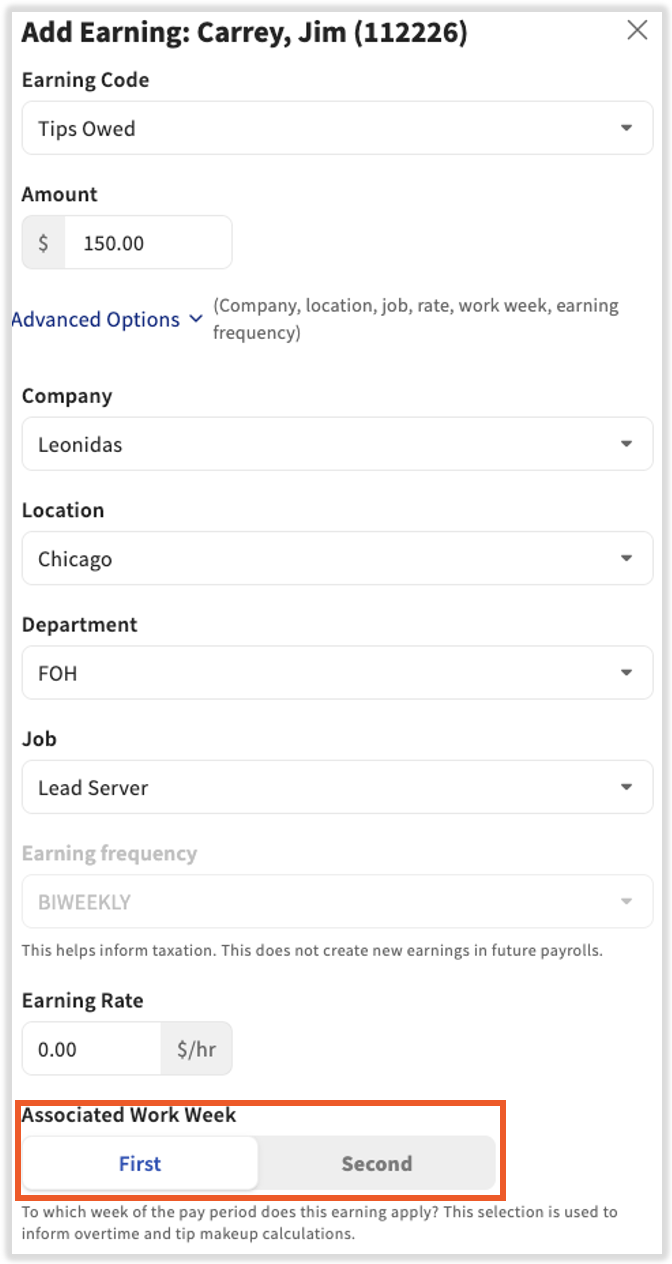
Tip makeup is calculated on a weekly basis. If you have a biweekly payroll frequency, tips will need to be assigned to specific weeks.
- If tips are added to Toast Payroll through a direct Toast integration or Toast Tips Manager, they will be connected to the appropriate workweek.
- If tips are imported into payroll via spreadsheets (uncommon), your import file will need to note if the tips are connected to week 1 or week 2 for tip makeup to calculate correctly. If your import template does not have a column for weeks, please reach out to payrollsupport@toasttab.com. If tips are not broken up by week, they will default to week 1 and could cause payroll discrepancies.
- If tips are added directly to the Employee Earnings step of the payroll process via one-time earnings, you can note which week it connects the tips to at the bottom of the Add Earning screen. If tips are not broken up by week, they will default to week 1 and could cause payroll discrepancies.
Back to top
Additional Resources
This content is for informational purposes and is not intended as legal, tax, HR, or any other professional advice. Please contact an attorney or other professional for advice.


